---
title: Shift Bookings For Desks
description: Set up Shift Bookings in Clearooms to offer fixed desk booking time patterns, including overnight shifts, with guidance on 24-hour office settings and advanced booking rules
---
[Skip to content](https://knowledgebase.clearooms.com/shift-bookings-for-desks#main-content)

Open main navigation
Close main navigation
- [Contact us](https://2feg9n.share-eu1.hsforms.com/2LEUbrOfJTIe01qcEQusU5w)
[Contact us](https://2feg9n.share-eu1.hsforms.com/2LEUbrOfJTIe01qcEQusU5w)
How can we help you?
- There are no suggestions because the search field is empty.
1. [Clearooms Knowledge Base](https://knowledgebase.clearooms.com/?hsLang=en-gb)
2. [Settings](https://knowledgebase.clearooms.com/settings?hsLang=en-gb)
3. [Desk Settings](https://knowledgebase.clearooms.com/settings?hsLang=en-gb#desk-settings)
# Shift Bookings For Desks
## Make desk booking more flexible with Shift Bookings in Clearooms. This feature adds a new booking pattern for desks alongside all-day, custom time, and half-day booking options.
Shift Bookings are available for **desks only**. They do **not** apply to meeting rooms.
### **What Shift Bookings are for:**
Shift Bookings let you create fixed time patterns that users can choose when booking a desk. Instead of asking users to enter custom times each time, you can provide a clear set of shift options that match how your workplace runs. Shift Bookings give you a simple way to support repeat desk booking patterns without relying on custom times for every booking. If you use overnight shifts, set the office working hours to 24 hours first, then test your advanced booking rules carefully before enabling the feature for users.
### **How to set up Shift Bookings**
### 1. Create your shift groups
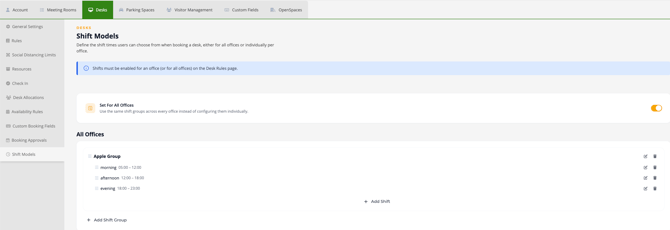
Set up the shift patterns you want to offer to users, to set this up go into your Settings \> Desks \> Rules \> select **Enable shift bookings \>** then proceed into **Shift Models** on the left of your portal options in Desks.
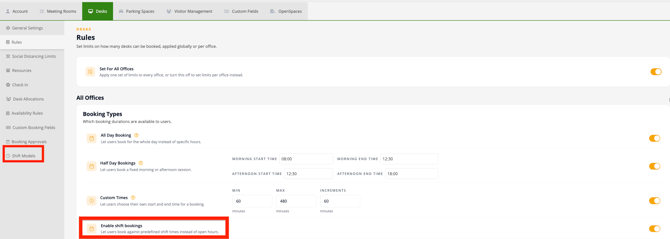
You can create shift groups at:
- **Individual offices** if the shifts are specific to one location
- **All offices** if the same shifts should be reused across multiple offices
### 2. Working Hours - Overnight shifts
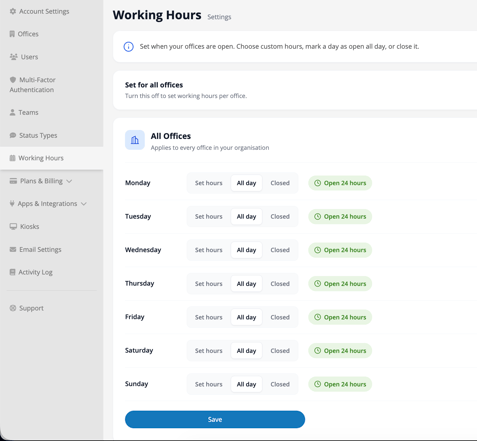
If any shift runs overnight, check the office working hours within your settings. Overnight shifts require the office to be open on a **24-hour schedule**. If the office working hours are not set to 24 hours, those shifts may not populate correctly in the shift dropdown.
If you need overnight shifts:
1. Open the office settings
2. Go to **Working Hours**
3. Change the office opening schedule to **24 hours**
4. Save your changes
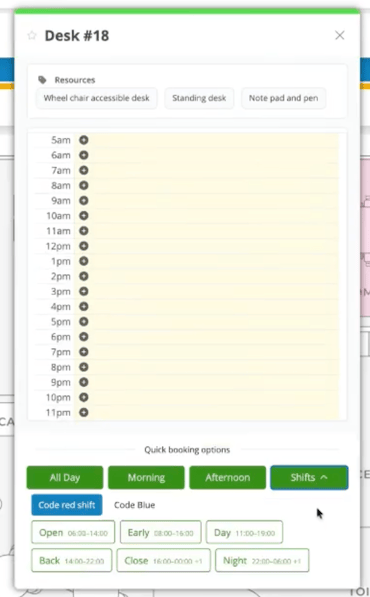
Once enabled and when a users then books a desk, they will be given the shift opens that have been created.
#### **Advanced booking rules for 24-hour shifts**
If you use advanced booking restrictions with 24-hour shifts, keep in mind that the rule resets at **midnight**.
That can affect how far in advance a user can book when a shift crosses from one day into the next. If you plan to combine Shift Bookings with advanced booking limits, we recommend testing your setup carefully before rolling it out more widely.
- [FAQs](https://knowledgebase.clearooms.com/faqs?hsLang=en-gb#main-content)
- [General](https://knowledgebase.clearooms.com/faqs?hsLang=en-gb#general)
- [Hosting & Security](https://knowledgebase.clearooms.com/faqs?hsLang=en-gb#hosting-security)
- [Desk Booking](https://knowledgebase.clearooms.com/faqs?hsLang=en-gb#desk-booking)
- [Meeting Rooms](https://knowledgebase.clearooms.com/faqs?hsLang=en-gb#meeting-rooms)
- [Getting started](https://knowledgebase.clearooms.com/getting-started?hsLang=en-gb)
- [General](https://knowledgebase.clearooms.com/general?hsLang=en-gb#main-content)
- [Troubleshooting](https://knowledgebase.clearooms.com/general?hsLang=en-gb#troubleshooting)
- [Desks](https://knowledgebase.clearooms.com/general?hsLang=en-gb#desks)
- [Meeting Rooms](https://knowledgebase.clearooms.com/general?hsLang=en-gb#meeting-rooms)
- [Admin Settings](https://knowledgebase.clearooms.com/general?hsLang=en-gb#admin-settings)
- [Planning](https://knowledgebase.clearooms.com/general?hsLang=en-gb#planning)
- [Reports](https://knowledgebase.clearooms.com/reports?hsLang=en-gb)
- [Settings](https://knowledgebase.clearooms.com/settings?hsLang=en-gb#main-content)
- [Users](https://knowledgebase.clearooms.com/settings?hsLang=en-gb#users)
- [Desk Settings](https://knowledgebase.clearooms.com/settings?hsLang=en-gb#desk-settings)
- [Meeting Room Settings](https://knowledgebase.clearooms.com/settings?hsLang=en-gb#meeting-room-settings)
- [Room Display App Settings](https://knowledgebase.clearooms.com/settings?hsLang=en-gb#room-display-app-settings)
- [Services](https://knowledgebase.clearooms.com/settings?hsLang=en-gb#services)
- [Account Settings](https://knowledgebase.clearooms.com/settings?hsLang=en-gb#account-settings)
- [Event Management](https://knowledgebase.clearooms.com/settings?hsLang=en-gb#event-management)
- [Visitor Management](https://knowledgebase.clearooms.com/settings?hsLang=en-gb#visitor-management)
- [Custom Fields](https://knowledgebase.clearooms.com/settings?hsLang=en-gb#custom-fields)
- [Multi-Factor authentication](https://knowledgebase.clearooms.com/settings?hsLang=en-gb#multi-factor-authentication)
- [Manager Settings](https://knowledgebase.clearooms.com/settings?hsLang=en-gb#manager-settings)
- [Billing](https://knowledgebase.clearooms.com/settings?hsLang=en-gb#billing)
- [Status](https://knowledgebase.clearooms.com/settings?hsLang=en-gb#status)
- [Apps](https://knowledgebase.clearooms.com/settings?hsLang=en-gb#apps)
- [Support](https://knowledgebase.clearooms.com/support?hsLang=en-gb)
- [Security](https://knowledgebase.clearooms.com/security?hsLang=en-gb#main-content)
- [SSO, SCIM Apps & Integrations](https://knowledgebase.clearooms.com/security?hsLang=en-gb#sso-scim-apps-integrations)
- [Privacy](https://knowledgebase.clearooms.com/security?hsLang=en-gb#privacy)
- [Desk Booking App](https://knowledgebase.clearooms.com/desk-booking-app?hsLang=en-gb)
- [Room Display App](https://knowledgebase.clearooms.com/room-display-app?hsLang=en-gb)
- [Video Tutorials](https://knowledgebase.clearooms.com/video-tutorials?hsLang=en-gb#main-content)
- [Getting Started With Clearooms](https://knowledgebase.clearooms.com/video-tutorials?hsLang=en-gb#getting-started-with-clearooms)
- [Clearooms Desk Booking App: Getting Started With Clearooms](https://knowledgebase.clearooms.com/video-tutorials?hsLang=en-gb#clearooms-desk-booking-app-getting-started-with-clearooms)
- [Desks](https://knowledgebase.clearooms.com/video-tutorials?hsLang=en-gb#desks)
- [Meeting Rooms](https://knowledgebase.clearooms.com/video-tutorials?hsLang=en-gb#meeting-rooms)
- [Smart Booking And Favourites](https://knowledgebase.clearooms.com/video-tutorials?hsLang=en-gb#smart-booking-and-favourites)
- [Clearooms Room Display App](https://knowledgebase.clearooms.com/video-tutorials?hsLang=en-gb#clearooms-room-display-app)
- [Apps And Integrations](https://knowledgebase.clearooms.com/video-tutorials?hsLang=en-gb#apps-and-integrations)
- [Users](https://knowledgebase.clearooms.com/video-tutorials?hsLang=en-gb#users)
- [Office Plan](https://knowledgebase.clearooms.com/video-tutorials?hsLang=en-gb#office-plan)
- [Desk Neighbourhoods & Meeting Zones](https://knowledgebase.clearooms.com/video-tutorials?hsLang=en-gb#desk-neighbourhoods-meeting-zones)
- [My Bookings](https://knowledgebase.clearooms.com/video-tutorials?hsLang=en-gb#my-bookings)
- [Services](https://knowledgebase.clearooms.com/video-tutorials?hsLang=en-gb#services)
- [Kiosk](https://knowledgebase.clearooms.com/video-tutorials?hsLang=en-gb#kiosk)
- [Custom Fields](https://knowledgebase.clearooms.com/video-tutorials?hsLang=en-gb#custom-fields)
- [Who's In](https://knowledgebase.clearooms.com/video-tutorials?hsLang=en-gb#whos-in)
- [Status](https://knowledgebase.clearooms.com/video-tutorials?hsLang=en-gb#status)
- [Help Centre](https://knowledgebase.clearooms.com/video-tutorials?hsLang=en-gb#help-centre)
- [OpenSpaces](https://knowledgebase.clearooms.com/video-tutorials?hsLang=en-gb#openspaces)
- [Parking Spaces](https://knowledgebase.clearooms.com/video-tutorials?hsLang=en-gb#parking-spaces)
- [OpenSpaces](https://knowledgebase.clearooms.com/openspaces?hsLang=en-gb)
- [Parking Spaces](https://knowledgebase.clearooms.com/parking-spaces?hsLang=en-gb#main-content)
- [Parking Misuse Reporting](https://knowledgebase.clearooms.com/parking-spaces?hsLang=en-gb#parking-misuse-reporting)
[](http://clearooms.com)
[mailto:support@clearooms.com](mailto:support@clearooms.com)
Copyright © 2025, clearooms.com
```json
{
"@context" : "https://schema.org",
"@type" : "VideoObject",
"contentUrl" : "https://146800859.fs1.hubspotusercontent-eu1.net/hubfs/146800859/video_assets/489926044915/inherited/web_optimized.mp4",
"dateModified" : "2026-10-13T11:30:11.656Z",
"duration" : "PT58.133S",
"height" : 1080,
"name" : "ShiftBooking-1-Book-your-shift-in-three-clicks-2",
"thumbnailUrl" : "https://146800859.fs1.hubspotusercontent-eu1.net/hubfs/146800859/ShiftBooking-1-Book-your-shift-in-three-clicks-2.mp4/medium.jpg",
"uploadDate" : "2026-10-13T11:30:06.777Z",
"width" : 1920
}
```