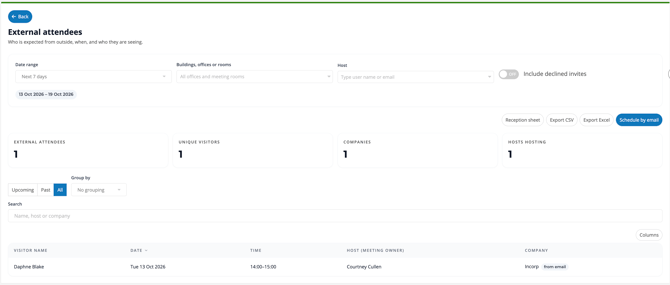
The External Attendees report lets you review external meeting participants, when their meetings take place, and who is hosting them. Use it to review upcoming or past meetings, prepare a reception sheet, or export the data for further analysis.
Viewing the Report
- Open the Reports page.
- Select External attendees.
- Choose the Date range you want to review.
- Apply any location or host filters you need.
- Review the summary cards and attendee details.
Filters
- Date range: Select the period to review, such as Next 7 days.
- Buildings, offices or rooms: Filter by the relevant building, office or meeting room.
- Host: Search for a host by user name or email.
- Include declined invites: Switch this on to include declined invitations in the results.
View Options
- Upcoming / Past / All: Choose whether to view upcoming records, past records or all records within your selected scope.
- Group by: Select from the available grouping options, or choose No grouping.
- Search: Find records by name, host or company.
- Columns: Customise which columns are displayed in the table.
Attendee Details
The report table includes:
- Visitor name
- Date
- Time
- Host (meeting owner)
- Company
Reception Sheet
Select Reception sheet to access a sheet for tracking building visitors.
Exporting the Report
The report offers two export options:
- Export CSV
- Export Excel
Use these to download the report data for further analysis.
Scheduling by Email
Select Schedule by email to open the report’s email scheduling options.