
Hide meeting details
Choose which meeting details to hide and who can view them.
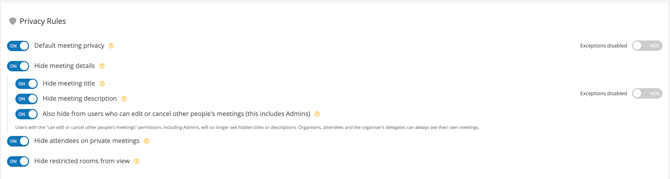
Enable this rule to configure the visibility of meeting titles and descriptions, including for meetings that are not marked as private. When switched on, the rule reveals three additional toggles. Use these options to choose which details to hide and whether the restrictions also apply to users who can edit or cancel other people’s meetings, including administrators.
Hide meeting title
Hide meeting titles from users without access to the details.
This option controls the hiding of meeting titles under the Hide meeting details rule. Switch it on to hide titles. To extend this restriction to administrators and other users who can edit or cancel meetings, also enable the permission-related option below.
Hide meeting description
Hide meeting descriptions from users without access to the details.
This option controls the hiding of meeting descriptions under the Hide meeting details rule. Switch it on to hide descriptions. To extend this restriction to administrators and other users who can edit or cancel meetings, also enable the permission-related option below.
Also hide from users who can edit or cancel other people’s meetings (this includes Admins)
Apply hidden-detail restrictions to administrators and users with meeting-management permissions.
When enabled, users with the can edit or cancel other people’s meetings permission, including administrators, can no longer see titles or descriptions hidden by the options above. Organisers, attendees and the organiser’s delegates can always see their own meetings.
How to configure Hide meeting details
- Open Settings > Meeting Rooms > Meeting Rules and scroll to Privacy Rules.
- Switch Hide meeting details to ON to reveal its additional options.
- Enable Hide meeting title to hide meeting titles.
- Enable Hide meeting description to hide meeting descriptions.
- If the restrictions should also apply to administrators and users with meeting-management permissions, enable Also hide from users who can edit or cancel other people’s meetings (this includes Admins).
Important: The three additional toggles are settings within Hide meeting details, not separate top-level privacy rules. The permission-related toggle extends the selected title and description restrictions; it does not replace those selections.

Users with the ability to edit others' meetings will still be able to view the details (this includes Administrators)