
Team Planner is a new bulk-booking tool that lets managers and team leads book desks for multiple users, teams, favourites or guests in a single workflow.
A step-by-step progress tracker walks you through booking details, people selection and a final review before you confirm.
Organising a team day in the office has always been a bit of a chore. Who is in, where do they need to sit, which desks are free, who likes which spot, and how do we keep the new starter next to their buddy? Team Planner does the lot in one screen
Pick your office, pick your date, pick your people (individuals, whole teams, favourites or guests) and our AI suggests a desk layout based on three things that actually matter: team proximity, user preferences and live availability.
What can Planning be used for?
Planning is especially useful when you need to:
- Book desks for a team on the same day
- Organise seating in advance
- Keep colleagues seated near each other
- Save time by managing multiple bookings in one action
How it works
- Open your Settings > Account Settings > Preferences and ensure "Team Planner" is toggled on
- Click Planning from the top menu bar and you can than select Team Planer (desks)
- Select from users, teams, Favourites or guests and add as relevant
- Choose the office and date
- Review the desk recommendations provided, edit if required
- Confirm the bookings
Progress Tracker
The Progress Tracker guides you through the booking process step by step.
There are 3 stages to complete:
1. Set booking details
Choose the booking date, office, and any other relevant options.
2. Select people
Choose the users you want to include in the booking.
3. Review desk assignments
Check the suggested desk allocations before confirming.

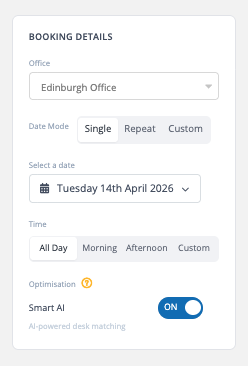
Booking Details
This is the first step of the Planning process, where you define your booking criteria.
You can select:
- The office
- Date mode (single, repeat, or custom)
- Time preferences
- Booking method (AI recommendations or manual selection)
These options set the criteria for the bookings before you move on to selecting people and reviewing desk assignments.
People & Assignments
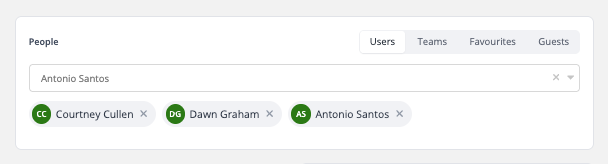
In this step, you can choose who to include in the booking.
You can:
- Search for individual users
- Select entire teams
- Add favourites
- Include guests
Once people are added, Clearooms will generate desk recommendations. You can then:
- Accept automatic assignments
- Adjust desk selections manually
AI Settings
This section lets you control how desk recommendations are generated.
Allocation strategies:
- Independent – assigns desks individually
- Clustered – groups users together
- Locked – keeps specific assignments fixed
- Keep teams together
- Prioritise favourite desks
These options allow you to tailor desk allocation to your team’s needs.
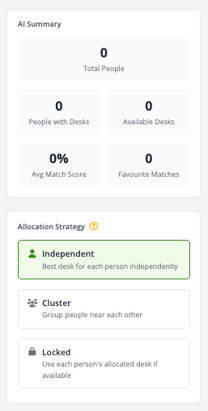
If Clustered is selected, additional options become available:
- Keep teams together
- Prioritise favourite desks
- Optimise for availability only
Review and Confirm
Once desks have been assigned, click Review & Confirm in the top-right corner to finalise your bookings.
You can view this guide again at any time by clicking the question mark in the bottom-right corner of the page.