
The Pool Cars feature allows you to register shared vehicles in Clearooms and manage who can access and use them.
To get started, go to Settings > Parking Spaces > Pool Cars and click Add Pool Car.
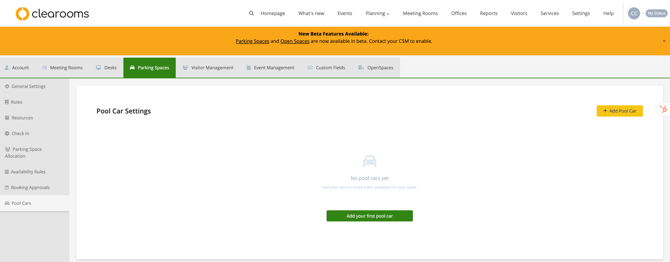
Add a Pool Car
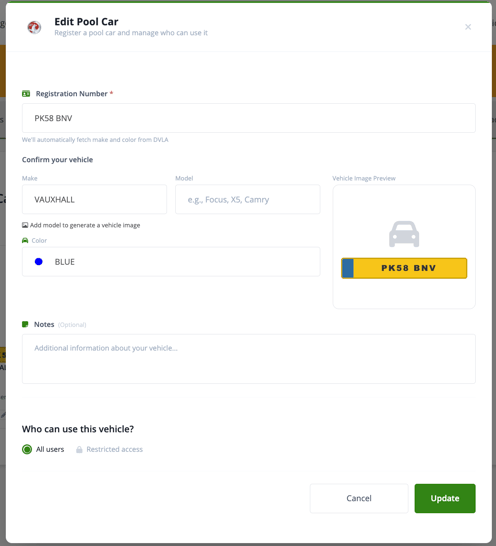
When adding a new pool car, you will be asked to complete a short form.
Enter the vehicle’s registration number, and Clearooms will automatically pull the vehicle details from the DVLA, including:
- Make
- Model
- Colour
You will also have the option to:
- upload an image of the vehicle
- add any additional notes
- choose who can access the vehicle
Set Access Permissions
When setting up the vehicle, you can choose one of the following access options:
- All Users – anyone in your Clearooms account can use the pool car
- Restricted Access – limit access to specific users
If you choose Restricted Access, you will be able to define access by:
- Teams
- Roles
- specific users by typing their name or email address
Where the Vehicle Appears
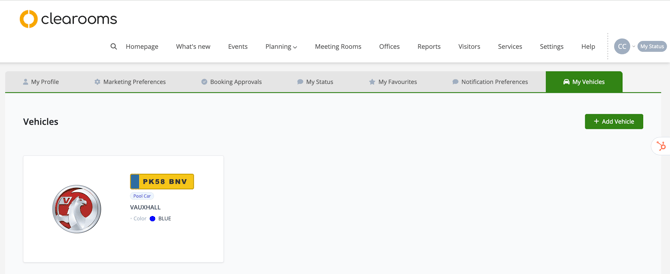
Once the pool car has been added, it will also appear under:
My Profile > My Vehicles
This allows the vehicle to be visible in the user profile area for those with access.
Individual users cannot create, edit, or delete a pool car. This can only be managed by an administrator.
Summary
Pool Cars makes it easy to manage shared vehicles in the same way Clearooms helps manage other workplace resources. Parking features in Clearooms are designed to support better control, user convenience, and smarter resource management.