
ArrivalsHQ is the front-of-house product from Clearooms. It replaces the paper visitor book with a branded sign-in kiosk at reception, and handles every kind of arrival in one place: visitors, contractors, deliveries and employees who need a temporary badge.
It runs as a native Android sign-in app paired with the Clearooms portal, so you manage it alongside desk, meeting room and parking booking, with the same login.
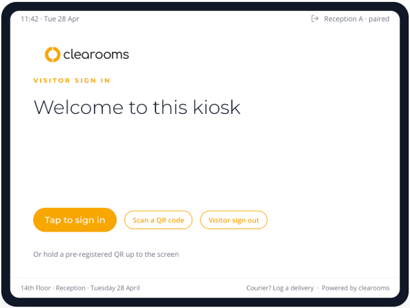
The ArrivalsHQ kiosk welcome screen
How ArrivalsHQ works
- Invite: a host pre-registers their visitor, who receives an email with a personal QR code, a short sign-in code and a calendar invite.
- Arrive: the visitor taps to sign in at the kiosk, or holds up their QR code. They can sign in in their own language.
- Sign in: the visitor follows the journey set up for their visitor type, for example entering their details, signing an NDA or watching a safety video.
- Welcome: the host is notified straight away, and a visitor badge can be printed automatically.
- Leave: the visitor signs out at the kiosk, or reception signs them out from the portal.
- Stay safe: if the building is evacuated, ArrivalsHQ shows who is on site and lets marshals run the roll call from any phone.
Who ArrivalsHQ helps
|
Who |
What they get |
|
Visitors |
A quick, welcoming sign-in in their own language, a QR code to skip the forms, and a badge printed as soon as they sign in. |
|
Hosts |
An email, Slack or Microsoft Teams alert the moment their visitor arrives, quick pre-registration, and a My visitors view of who is expected. |
|
Reception |
A live dashboard of who is on site, who is expected and which deliveries are waiting, plus a daily 08:00 expected-visitors digest and no-show alerts. |
|
Admins |
One place to brand the kiosk, design sign-in journeys, manage documents, kiosks and printers, and see reports. Main features |
Main features
|
Feature |
What it does |
|
Sign-in journeys |
A tailored sign-in for each visitor type, such as a two-field flow for couriers and a full induction for contractors. |
|
Pre-registration |
Invite visitors in advance with a QR code, sign-in code, calendar invite and documents to read before they arrive. |
|
Documents and compliance |
NDAs, safety agreements and inductions signed on screen, with a record of who signed which version and when. |
|
ID scanning |
Scan a driving licence or passport at the kiosk, with expiry checks and secure deletion on schedule. |
|
Badges and printing |
Badges printed automatically, with seven designs to choose from. |
|
Deliveries |
Log parcels at the kiosk, email the recipient and send automatic reminders until they are collected. |
|
Staff sign-in |
Staff sign in and out with a badge or code and set their status. |
|
Emergency and roll call |
Start an evacuation, show the alarm screen on every kiosk and mark people safe from any phone. |
|
Kiosk management |
Pair, monitor and manage every tablet from the portal, including battery and connection status. |
|
Insights and reports |
Dashboards for visitor trends, kiosk health, safety drills, compliance and deliveries, with CSV export. |
Plans
ArrivalsHQ is priced per site, per year. Plans build on each other, so each plan includes everything in the one below it. SSO and SCIM are included on every plan.
|
|
Price |
Best for |
|
Essentials |
£330 per site per year |
Single-reception offices, charities and education. Everything you need to replace a paper visitor book. |
|
Plus |
£680 per site per year |
Organisations that need compliance, badges, deliveries and staff features. |
|
Professional |
£1,140 per site per year |
Multi-tenant buildings and large corporates that want custom journeys and full control of data retention. |
Prices are for annual prepayment. Monthly billing is also available. Multi-site, charity and pilot discounts are available on request.
Compare plans
|
Feature |
Essentials |
Plus |
Professional |
|
Native Android sign-in kiosk |
✓ |
✓ |
✓ |
|
Walk-in logging and visitor dashboard |
✓ |
✓ |
✓ |
|
Host email notifications and welcome emails |
✓ |
✓ |
✓ |
|
Pre-registered and future-dated visitors |
✓ |
✓ |
✓ |
|
Pre-registration QR invitations with live email preview |
✓ |
✓ |
✓ |
|
Tailored registration form |
✓ |
✓ |
✓ |
|
Visitor reports and insights suite |
✓ |
✓ |
✓ |
|
Slack and Microsoft Teams arrival notifications |
✓ |
✓ |
✓ |
|
Branding studio with live preview and WCAG checker |
✓ |
✓ |
✓ |
|
Camera presence detection and kiosk sleep |
✓ |
✓ |
✓ |
|
Kiosk pairing, telemetry and fleet health |
✓ |
✓ |
✓ |
|
SSO and SCIM |
✓ |
✓ |
✓ |
|
Multi-language sign-in (nine languages, including Welsh) |
✓ |
✓ |
✓ |
|
Single-document acknowledgement |
✓ |
✓ |
✓ |
|
Roll-call and evacuation list |
✓ |
✓ |
✓ |
|
Audit trail and CSV export |
✓ |
✓ |
✓ |
|
Staff sign-in |
✓ |
✓ |
✓ |
|
Visitor approvals workflow |
✓ |
✓ |
✓ |
|
All visitor types (contractor, delivery, employee, custom) |
- |
✓ |
✓ |
|
Deliveries: drop-off points, auto-chase reminders and delivery insights |
- |
✓ |
✓ |
|
Badge designer (7 styles) and on-device photo capture |
- |
✓ |
✓ |
|
Printer management and print history |
- |
✓ |
✓ |
|
Multi-document compliance library and Draft with AI |
- |
✓ |
✓ |
|
ID scanning (driving licence or passport) and expiry audit |
- |
✓ |
✓ |
|
Accessibility and support capture |
- |
✓ |
✓ |
|
Geo-fenced automatic staff check-in |
- |
✓ |
✓ |
|
Emergency suite: kiosk alarm, marshal roll call, drills and clearance reports |
- |
✓ |
✓ |
|
Custom journey builder, template gallery and Build with AI |
- |
- |
✓ |
|
Multi-tenant or multi-organisation reception |
- |
- |
✓ |
|
Configurable retention periods |
- |
- |
✓ |
|
Audit-log retention |
12 months |
24 months |
Configurable |
How to tell which plan a feature needs
In the ArrivalsHQ portal, features that need a particular plan show a plan label, for example Arrivals HQ Plus plan feature. To see your current plan or upgrade, select Plan & upgrade in the ArrivalsHQ menu.
Hardware and languages
- Tablets: ArrivalsHQ runs on standard Android tablets, locked into kiosk mode and managed from the portal. You can use your own tablets, or we can quote tablets, stands and badge printers separately.
- Languages: visitors can sign in in English, French, German, Italian, Welsh, Spanish, Portuguese, Polish or Dutch.
Support
Every ArrivalsHQ plan includes a dedicated account manager, with telephone, email and live chat support, at no extra cost.
Next steps
- Navigating your ArrivalsHQ dashboard: find your way around the portal.
- ArrivalsHQ quick start checklist: the steps to get your first kiosk live.
- Creating and editing a sign-in journey: build the sign-in your visitors will use.
- Setting up hosts: choose who can receive visitors.